Writing Effective Positions
A playbook review is only as good as its positions. Each position tells the AI what to look for on one negotiation topic, what counts as acceptable, and what language to propose when a clause falls short. Vague positions produce vague reviews. Precise ones flag the right clauses and give reviewers something to act on.
This guide is about writing each part of a position well. For the field-by-field list of everything a position holds, see Position Reference. To open the editor, go to Playbooks, open a playbook you can edit, and select a position (or Add Position).
Write the description as a standard, not a wish
Section titled “Write the description as a standard, not a wish”The description is the heart of the position. It states what the contract must or must not contain, written as a standard a reviewer can check against. The AI judges every relevant clause against it, so be declarative and specific. The single biggest cause of bad reviews is a description the AI cannot measure.
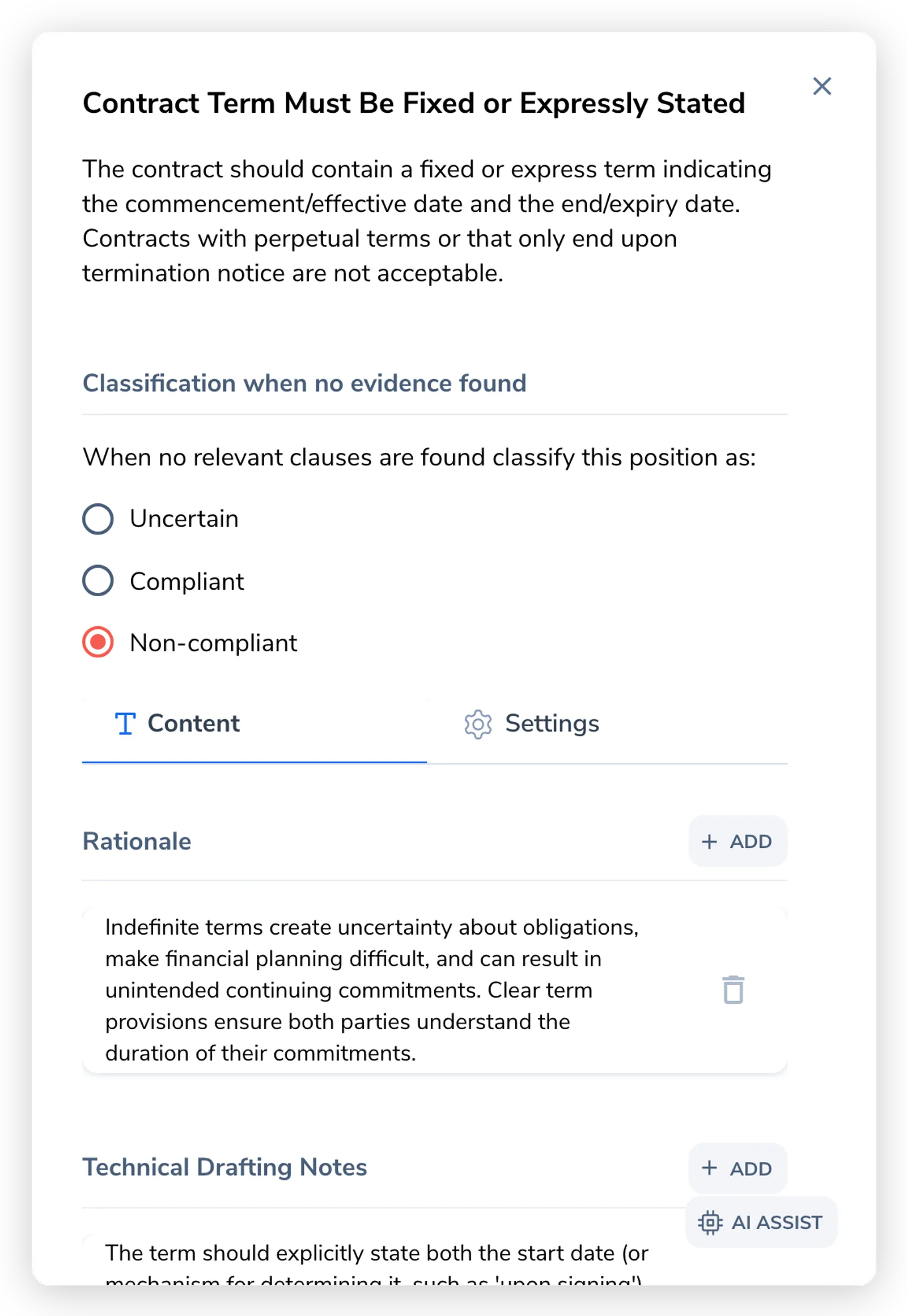
| Weak | Strong |
|---|---|
| ”Liability should be reasonable." | "Our aggregate liability must be capped at the fees paid in the 12 months before a claim." |
| "Payment terms should be acceptable." | "Payment terms must be Net 30 or longer." |
| "Indemnification should be balanced." | "Indemnification must be mutual, covering each party’s negligence and willful misconduct.” |
Avoid subjective words like “reasonable”, “standard”, or “appropriate” unless you define them. The AI cannot judge “reasonable”; it can judge “12 months of fees”. Keep the description tight; if it runs long, that detail usually belongs in a note rather than in the requirement itself. The editor nudges you toward this once a description grows past a few hundred characters.
Get the no-evidence classification right
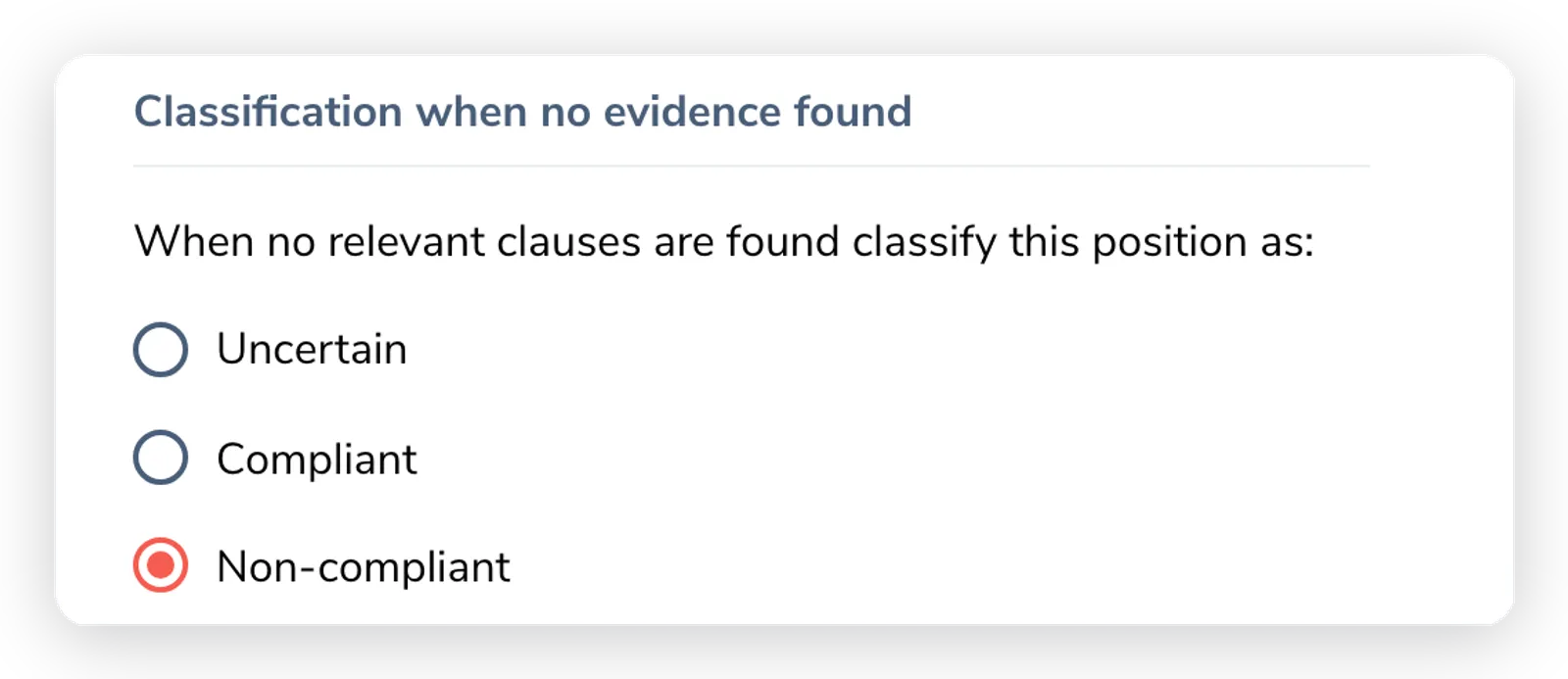
Section titled “Get the no-evidence classification right”Every position carries a Classification when no evidence found setting: the verdict the AI assigns when it finds no relevant clause in the contract. This is the most error-prone setting on a position, and the answer follows directly from whether the position is a requirement or a prohibition.
| The position says… | If no clause is found, that is… | Set it to |
|---|---|---|
| The contract must include / specify X (a requirement) | bad, the required thing is missing | Non-compliant |
| The contract must not contain / permit X (a prohibition) | good, the prohibited thing is absent | Compliant |
| Genuinely ambiguous from absence alone | unclear, a person should decide | Uncertain |
The trap is defaulting every position to Non-compliant. Prohibition positions then flag as failures precisely when the contract is clean. Phrasing like “must not exceed 30 days” is genuinely ambiguous, so test it against the requirement-vs-prohibition question rather than guessing, and fall back to Uncertain when absence alone does not tell you. For the full setting and how it feeds the final verdict, see Position Reference.
Add notes only when they earn their place
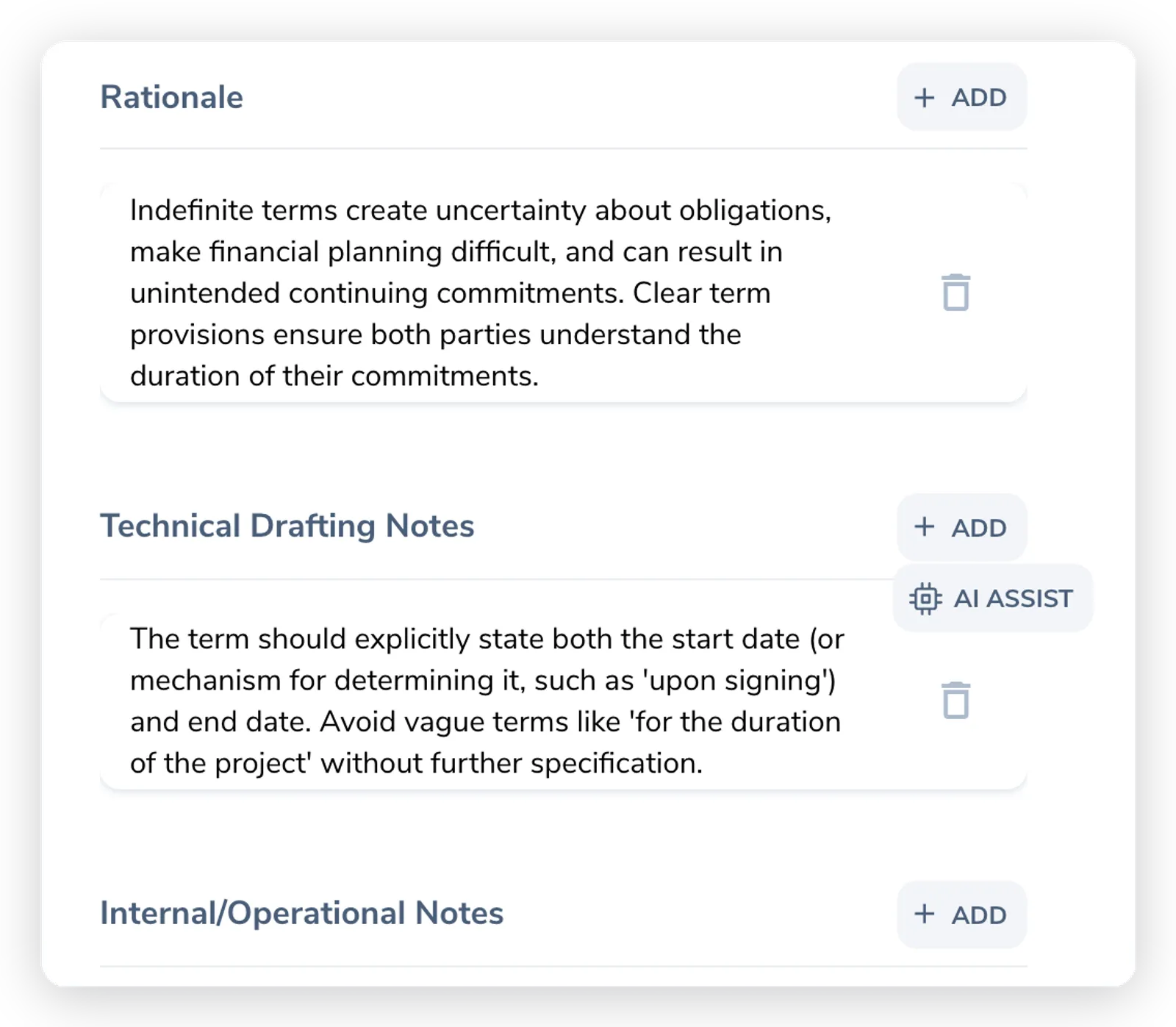
Section titled “Add notes only when they earn their place”The Content tab holds three separate note types, kept out of the requirement itself. Each is optional, and most positions need none. Add a note only when you have something real to record; do not invent rationale to fill a field. Over-authored positions are a common first-playbook mistake.
- Rationale explains why the position exists. The AI draws on it when it justifies a flag to the counterparty, so a clear rationale produces better explanations.
- Technical Drafting Notes capture how to draft or amend the clause: phrasing to prefer, defined terms to align, pitfalls to avoid.
- Internal/Operational Notes hold context for your own team that should not reach counterparty-facing output, such as internal handling instructions or a link to a policy.
Give reviewers a fallback
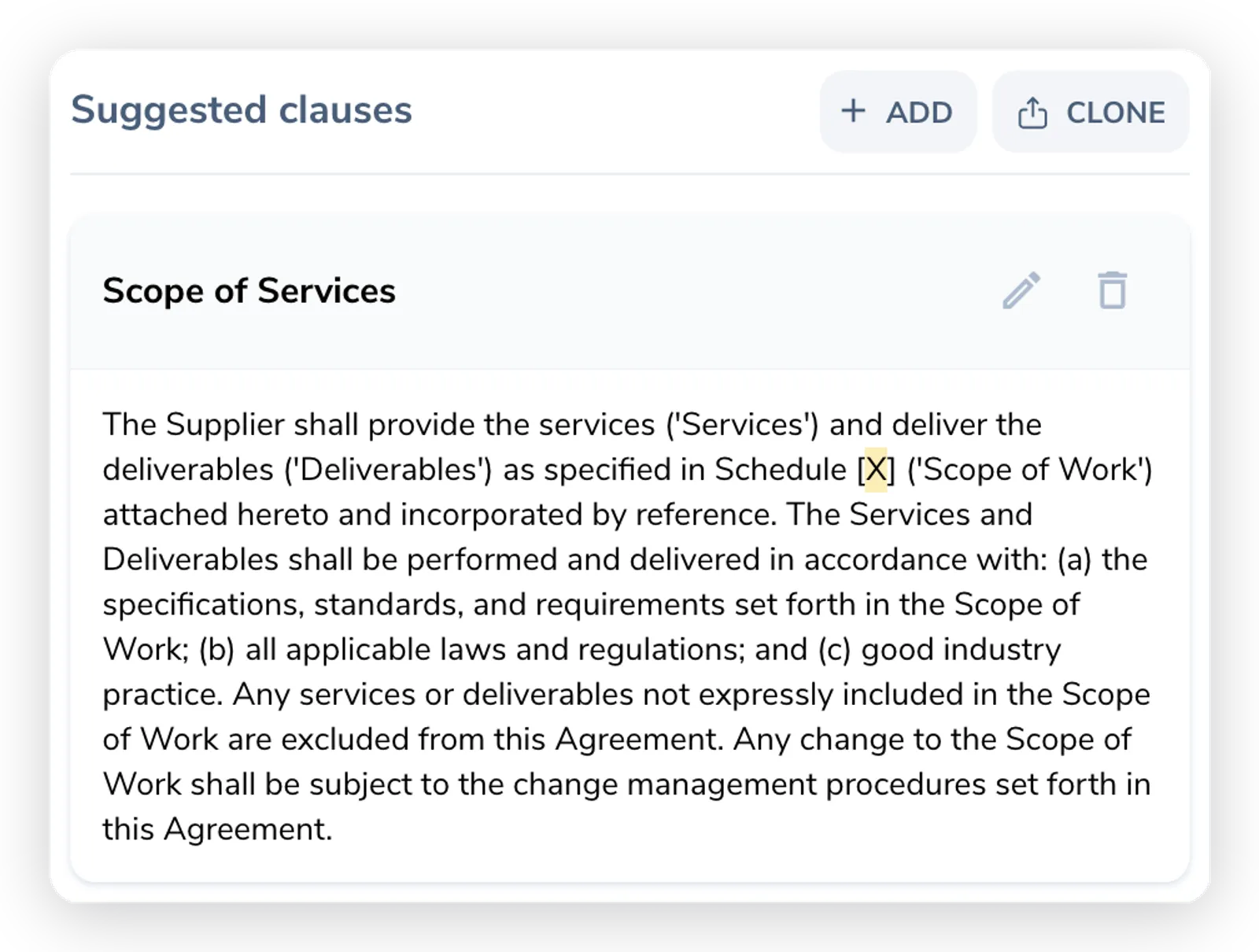
Section titled “Give reviewers a fallback”Suggested clauses are pre-approved language a reviewer can drop in when a clause is flagged, instead of drafting from scratch. At least one suggested clause turns a flag into an action. The same list appears in the Word plugin as Preferred clauses, where it inserts with one click.
- Title each one so its use is obvious: “Standard Mutual Liability Cap (12 months)”, “Acceptable Compromise (24 months)”, “Minimum Acceptable (total fees)”.
- Write complete, ready-to-insert language. The plugin’s Adapt & Insert action adjusts party names and defined terms to match the live contract, so you do not need placeholders.
- Order by preference. Put the language you most want first, acceptable compromises next, your final position last. This gives reviewers a negotiation ladder that stays inside your approved bounds.
You can pull a clause from your organization’s clause bank with the clone control, and push a new clause back into the bank with the Add to clause bank checkbox while you add it, so the same language is reusable across positions and playbooks.
Use examples where the line is subtle
Section titled “Use examples where the line is subtle”The Examples section lets you give the AI labeled clause samples, so it learns your line between acceptable and not. Add Positive examples (clause text that should pass, with a justification) and Negative examples (clause text that should fail, again with a justification).
Examples are most useful where the boundary is subtle and a description alone leaves room for interpretation. A couple of well-chosen samples calibrate the review better than a longer description. They are optional, and many positions work well without any.
Tune keywords against real reviews
Section titled “Tune keywords against real reviews”On the Settings tab, Keywords help the AI locate the clause a position is about. The AI also reads the contract semantically, but good keywords improve precision where wording varies. Each keyword has a type:
| Type | Behavior | When to use |
|---|---|---|
| Pattern match | Matches a word and its variations: “info” also matches “information”. | The default. Use for most keywords. |
| Exact match | Matches the exact term only: “info” does not match “information”. | Specific phrases that should not be broadened. |
| Negative match | Discards clauses containing this exact term. | Filter out false positives. |
The best way to tune keywords is to run a review and look at what the position found. If it missed the clause, add variations as pattern keywords. If it pulled in the wrong clause, add a negative keyword. For a Limitation of Liability position that keeps matching insurance clauses (which also say “liability”), add “insurance liability” as a Negative match to filter them out.
Test before you publish
Section titled “Test before you publish”Once your positions are written, run the playbook over a few real contracts before publishing. Check that each position finds the right clause and reaches the right verdict, then tune the descriptions, keywords, and no-evidence classifications that miss. Publishing locks the positions, so the draft stage is where this calibration belongs. For reading the results, see Reviewing a Third-Party Contract and Running a Playbook Review in Word.