Projects
Finance needs the liability caps across every active service agreement by Friday. The manual approach is always the same: open each document, find the clause, copy the value into a spreadsheet, repeat. A comparison across dozens of contracts can take days, and the answers are only as reliable as the person reading each one.
A Project does that reading for you. Pick the contracts, define the data points you want (governing law, expiry date, liability cap, a yes/no flag for a clause you care about), and the AI reads every document and fills a structured grid: contracts down the rows, your data points across the columns. Each cell carries the extracted value, the AI’s reasoning, and a quote from the source clause, so you can verify what it found.
| Governing law | Expiry | Liability cap | |
|---|---|---|---|
| MSA · Acme | New York | 14 Aug 2026 | $5M |
| NDA · Globex | England | 31 Dec 2025 | N/A |
| SaaS · Hooli | Delaware | 03 Mar 2027 | $2M |
Value 14 Aug 2026
Reasoning Clause 9.1 sets a two-year term from the effective date.
“…this Agreement shall expire on 14 August 2026…”
Every cell carries the AI's value, its reasoning, and a quote from the source clause — so you can verify what it found.
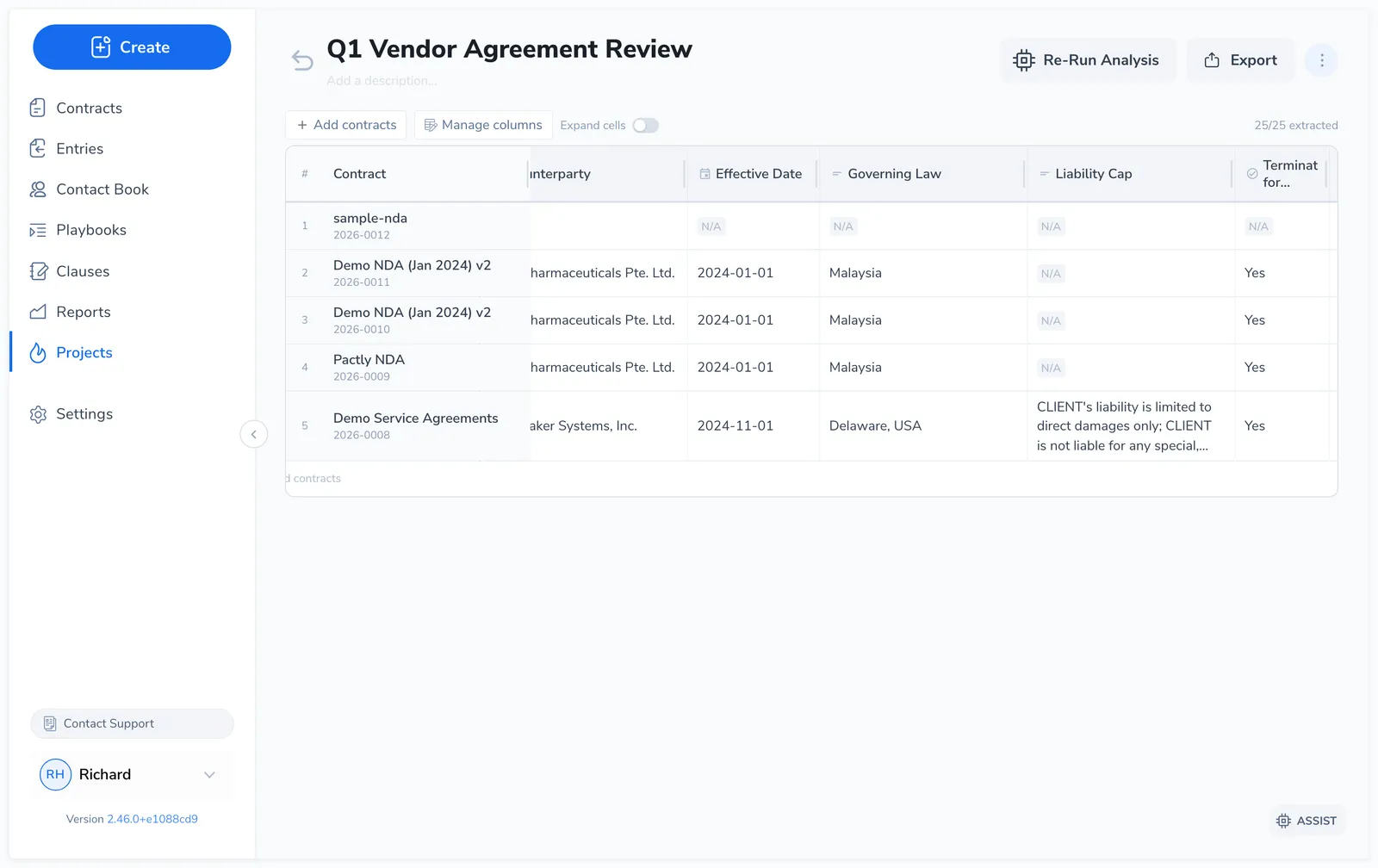
In the left nav this is Projects, and it opens as a Tabular Review. Every project has the same shape: one row per contract, one column per data point. A column can extract a value, classify the contract into options you define, or score the other columns into a rating.
Before you start
Section titled “Before you start”Projects reads from contracts you already have, so you need contracts in the repository first. You can pull them straight from the repository, or upload files into the project (which also files them in the repository). With an empty repository there is nothing to analyze. For how contracts get there, see Contracts.
Who can see a project
Section titled “Who can see a project”A project is visible to the person who created it, to anyone they add to it, and to your company admins. Nobody else in the company can see it or knows it exists.
The person who created it is its owner. Owners and admins can add and remove people, rename, duplicate and delete the project. Use Manage access in the project header to see who has access and to change it.
Adding someone to a project gives them every document in it, including documents added later, and everyone in the project sees the same rows and the same results. That is the point of a project: a shared view of one set of contracts. Add people deliberately, and to hand results to someone who should not have that access, export the grid to Excel and send the file instead.
If the owner’s account is deactivated, the project passes to an admin so it never becomes unreachable.
What’s in this section
Section titled “What’s in this section”This section also covers writing good column questions, classification and scoring columns, and checking and trusting AI results.