Approval Pathways
Before a contract gets signed, most teams want someone to look it over and give the go-ahead: a legal lead checks the terms, finance signs off on the value, a department head confirms the budget. The hard part is making that sign-off consistent, the right people in the right order every time, without chasing anyone over email.
An approval pathway is how you set that up. You decide who has to approve a contract and whether they approve all at once or one after another. Pactly then sends the requests, collects the responses, and moves the contract forward when everyone has approved.
Two things to get right first
Section titled “Two things to get right first”These two points cause the most confusion. Read them before you set anything up.
The four pathway shapes
Section titled “The four pathway shapes”Almost every approval setup is one of four shapes. Approval is opt-in per contract type, so you pick the shape that fits each kind of contract.
- No approval. The contract goes from In Negotiation to Pending Signature with no sign-off step. You set this by not configuring an approval step for that type. This is a first-class option, not a misconfiguration. Use it for low-risk, high-volume types like standard NDAs and MOUs where turnaround matters more than a gate.
- Single approver. One named person is the sole sign-off, often a General Counsel or legal lead who wants visibility but not a committee. The contract advances the moment they approve.
- Sequential. Approvers respond one at a time, in a set order. Pactly asks the first; only after they approve does it ask the next. Each approver sees their position in the chain (“Approver 2 of 3”). Use it for review-then-approve flows or a seniority chain (Legal, then Finance, then an executive).
- Parallel. Every approver is asked at once and can respond in any order, but all of them must approve before the contract advances. If any one rejects, the approval fails. Use it when two departments each need to sign off independently, like Finance and Procurement on a vendor contract.
Setting up a pathway
Section titled “Setting up a pathway”You configure approvers from the contract’s approvers panel. The same controls appear when an administrator builds approval into a workflow with the Set approvers action, so the labels are identical whether you send a request by hand or wire it into automation.
- In the contract’s approvers panel, find Approval order.
- Choose Parallel (All approvers review at the same time) or Sequential (Approvers review in order one by one). For a single approver, either setting works, the order does not matter with one person.
- Under Approvers, click Add Approver and select a user. For sequential, add them in the order they should respond; their order in the list is the order of the chain.
- Click Send Approval Request.
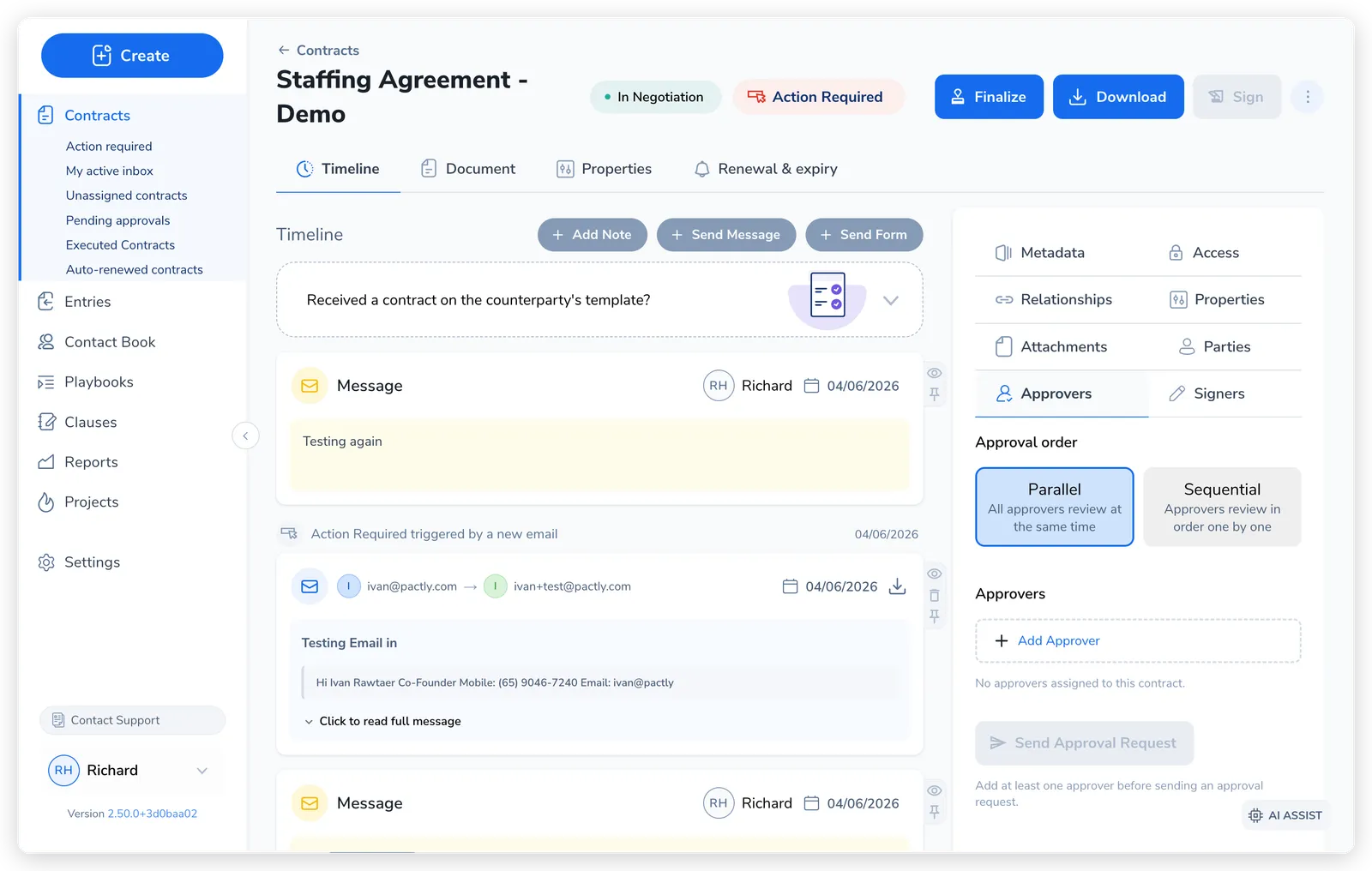
As the contract is finalized and sent for approval, it moves to Pending Approval. In a parallel pathway, every approver is emailed immediately. In a sequential pathway, only the first is emailed; the rest are marked as waiting and notified in turn as the chain advances.
If the contract still has a form request awaiting completion, the Send approval request dialog warns you before the request goes out. Sending for approval does not complete the form request, so click Cancel to follow it up first, or Send request to go ahead if that is intentional.
What approval does to the contract
Section titled “What approval does to the contract”Approval is a gate between negotiation and signing. The pathway shape decides who is asked and when, but the effect on status is the same across all of them.
| Event | Contract status |
|---|---|
| Approval request sent | Pending Approval |
| All approvers approve | Pending Signature (ready to sign) |
| Any approver rejects | In Negotiation (back to drafting) |
In a parallel pathway, each approval is recorded as it arrives; once the last outstanding approver approves, the contract moves to Pending Signature. In a sequential pathway, approving the current step activates the next approver; when the final step approves, the contract moves on.
A rejection ends the approval. The approver is asked for a reason, the requester and owner are notified, and the contract returns to In Negotiation so the terms can be revised. In a sequential pathway, anyone further down the chain is skipped.
Once the issue is fixed, Resume from declined step is available when the sequential approvers and their order are unchanged. It keeps earlier approvals and their original decision times, asks the declined approver again, then continues through the remaining steps. The confirmation explains which approvals will be kept.
For the current parallel approval round, select Retry approval request beside a declined or cancelled approver on the contract timeline. Only that person receives a new request. Everyone else’s decisions and original decision times stay unchanged, and the previous response remains in the approval history. Retry each outstanding person separately; retrying one person does not restart the others.
Start a new approval request if the document or basis for approval has changed, or everyone needs to review again. A new request starts the pathway from the beginning. Resuming a sequential pathway requires the same approvers in the same order. Approved, cancelled, and previous rounds cannot be reopened with an individual retry.
Once a contract reaches Pending Signature, it hands off to the e-signature step and becomes Executed after everyone signs. See E-Signatures for that part of the arc.
A note on terminology
Section titled “A note on terminology”Related
Section titled “Related”These pathways are one piece of Pactly’s wider automation. See Workflows for how approvals fit alongside the other events and actions.