Writing Column Questions
The 15 preset columns cover the common data points, like dates, governing law, value, and liability. But the value of a project is usually the question the presets don’t ask: “Is there a change-of-control clause?”, “What are the payment terms?”, “Does this contract mention personal data processing?”
That is where you write your own column. A column is three things you define: a Question (the prompt the AI answers for every contract), a Type (the shape of the answer), and a Label (the column header). The result depends almost entirely on how you write the Question, so that is what this guide covers.
The prompt the AI answers for every contract. The result depends almost entirely on how you write it, so phrase it as one clear instruction.
The shape of the answer — Text, Number, Date, Yes / No, or List. It controls how the column sorts, filters, and exports.
The column header shown in the grid. Display name only — it does not affect extraction.
Drives the result Display only · Type shapes how it sorts and exports
Add a Column
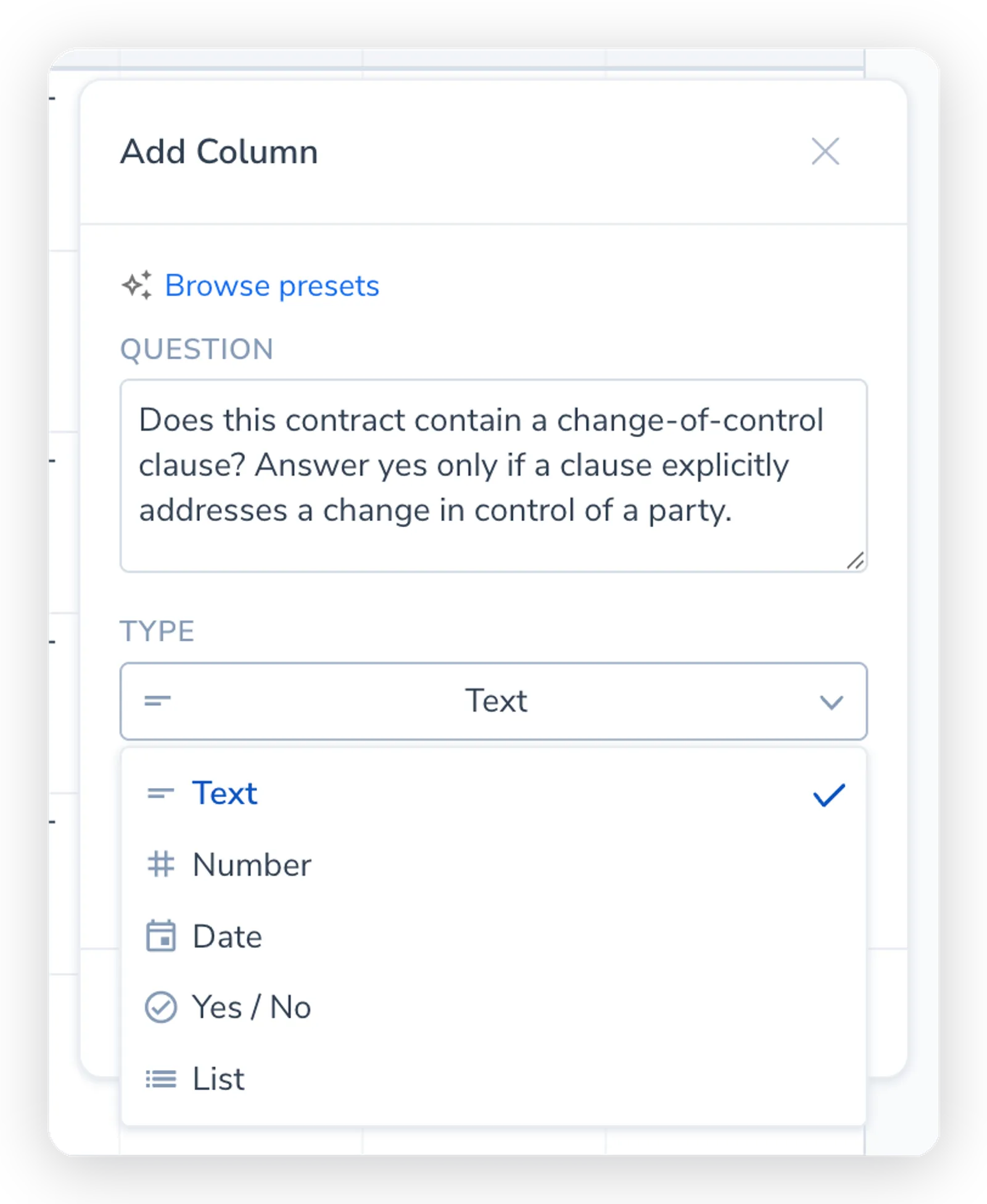
Section titled “Add a Column”You write a custom column from the same editor used for presets. Click the + at the end of the column headers to open the quick column editor (a popover with a preset search at the top and the Question, Type, and Label fields below). Manage columns in the toolbar opens the fuller column manager, but the popover is all you need to add one column.
In the editor:
- Write the Question. Type what you want the AI to extract from each contract. This is the prompt the AI answers per contract, so phrase it as one clear instruction.
- Set the Type. Choose the answer format: Text, Number, Date, Yes / No, or List. Match it to the kind of answer your Question asks for. (Two further types, Computed status and Compare to reference, are not driven by a Question. See Classification and Scoring Columns.)
- Set the Label. Give the column a short header for the grid (the Label field, placeholder “Column name”). The Label is the display name only; it does not affect extraction.
- Click Add. The column appears in the grid. Run Analysis to extract it across your contracts.
Write a Good Question
Section titled “Write a Good Question”The Question is a prompt sent to the AI for each contract. Four habits make the difference between a clean column and a messy one.
Ask one clear thing
Section titled “Ask one clear thing”Each column answers one question. If you bundle two asks into a Question (“What is the term and the renewal notice period?”), the answer lands in one cell as a run-on string you cannot sort or filter. Split it into two columns instead, one for the term and one for the notice period.
Vague: “Liability” Clear: “What is the aggregate cap on liability, including the amount and what it applies to?”
Match the Type to the answer
Section titled “Match the Type to the answer”The Type tells the AI what shape the answer should take, and it controls how the column sorts, filters, and exports. Pick the Type that matches the question you are asking.
| Type | Use it when the answer is | Example Question |
|---|---|---|
| Text | A phrase, a clause summary, a name | ”What is the governing law of this contract?” |
| Number | A single numeric value | ”How many days notice are required to terminate?” |
| Date | A specific date | ”What is the contract’s effective date?” |
| Yes / No | A true/false answer | ”Does this contract allow termination for convenience?” |
| List | The answer is one of a set of options you define | ”Which of these categories best describes this agreement?” |
A List column with no options behaves as free text. Add options and it becomes a classification: the AI must answer with one of your labels or leave the cell blank, which is what makes the column countable. See Classification and Scoring Columns.
A common mistake is asking a yes/no question with a Text type. “Is there a change-of-control clause?” on Text gives you sentences that vary contract to contract. On Yes / No you get a clean column you can filter to find every contract that has the clause.
Be specific about what counts
Section titled “Be specific about what counts”The AI extracts what your Question describes, so describe it precisely. Spell out the unit, the format, and any edge cases you care about.
- Name the unit or format. “What is the notice period in days?” is better than “What is the notice period?” which might return “two months” for one contract and “60 days” for another. For a Date column, ask for the format you want (the presets request
YYYY-MM-DD). - Disambiguate look-alike terms. Dates are the classic trap: effective date, commencement date, and start date are not always the same clause. Say which one you mean: “Extract the commencement date, not the signing date.”
- Say what to do when it is absent. If a value can legitimately be missing, the AI marks the cell N/A when it cannot find it, so you do not have to handle that in the Question. But if a term has a default (“If no governing law is stated, return ‘Not specified’”), say so.
Add an example in the Question
Section titled “Add an example in the Question”The single most reliable way to steer the answer is to show the AI what a good answer looks like. The presets do this: the Governing Law preset asks for the jurisdiction and gives examples (“England and Wales”, “State of New York”, “Singapore”) so every cell comes back in the same style.
Do the same in your own Questions:
- “Extract the total contract value including currency, e.g. ‘USD 250,000’ or ‘GBP 1.2M per year’.”
- “What is the payment term? Return the number of days, e.g. ‘Net 30’, ‘Net 60’.”
An example does two jobs: it pins down the format so the column is consistent across contracts, and it removes ambiguity about what you are actually asking for.
Borrow From the Presets
Section titled “Borrow From the Presets”The fastest way to write a strong custom Question is to start from one that already works. Open Browse presets in the column editor, pick the closest preset (for instance, Liability Cap or Termination Triggers), and edit its Question before adding the column. Preset Questions are written to the four habits above, so they are a good template for your own.
If you change a column’s Question after running analysis, every cell already extracted for that column is flagged as stale. The cell is styled as out-of-date, and its hover popover shows “Column prompt was changed. Re-run analysis to update this result.” The cell keeps its last value, but it may no longer match the new Question. Run analysis again to re-extract just those cells. So iterate on the wording while the column is empty if you can, then run once you are happy with it.
A Few Recipes
Section titled “A Few Recipes”These are custom Questions for common asks the presets do not cover. Use them as a starting point and tune the wording to your contracts.
| You want to know | Type | Question |
|---|---|---|
| Whether a change-of-control clause exists | Yes / No | ”Does this contract contain a change-of-control provision? Answer yes only if there is an explicit clause addressing a change in control of a party.” |
| Whether assignment is restricted | Yes / No | ”Does this contract restrict either party from assigning it without the other party’s consent?” |
| Payment terms | Text | ”What are the payment terms? Return the invoice and payment timing, e.g. ‘Net 30 from invoice date’.” |
| Auto-renewal | Yes / No | ”Does this contract automatically renew at the end of its term unless notice is given?” |
| Whether personal data is processed | Yes / No | ”Does this contract involve the processing of personal data or include data-protection / GDPR terms?” |
| Renewal notice period | Number | ”How many days notice are required to prevent automatic renewal? Return the number of days.” |