Signature Validity and the Trusted Seal
Once a contract is signed, anyone you send it to needs to trust that the PDF is genuine and has not been altered since. A signature that shows up as “unknown” or “unverified” when someone opens the file undercuts that trust, even when the signing was real.
A contract signed with Pactly e-Sign carries a trusted digital seal. The signed PDF is sealed at execution, so a standard PDF reader can confirm on its own that the document is authentic and untouched, with no extra step from you or the recipient.
What the recipient sees
Section titled “What the recipient sees”Open a Pactly-signed contract in Adobe Acrobat or Adobe Reader and the signature panel verifies automatically, showing:
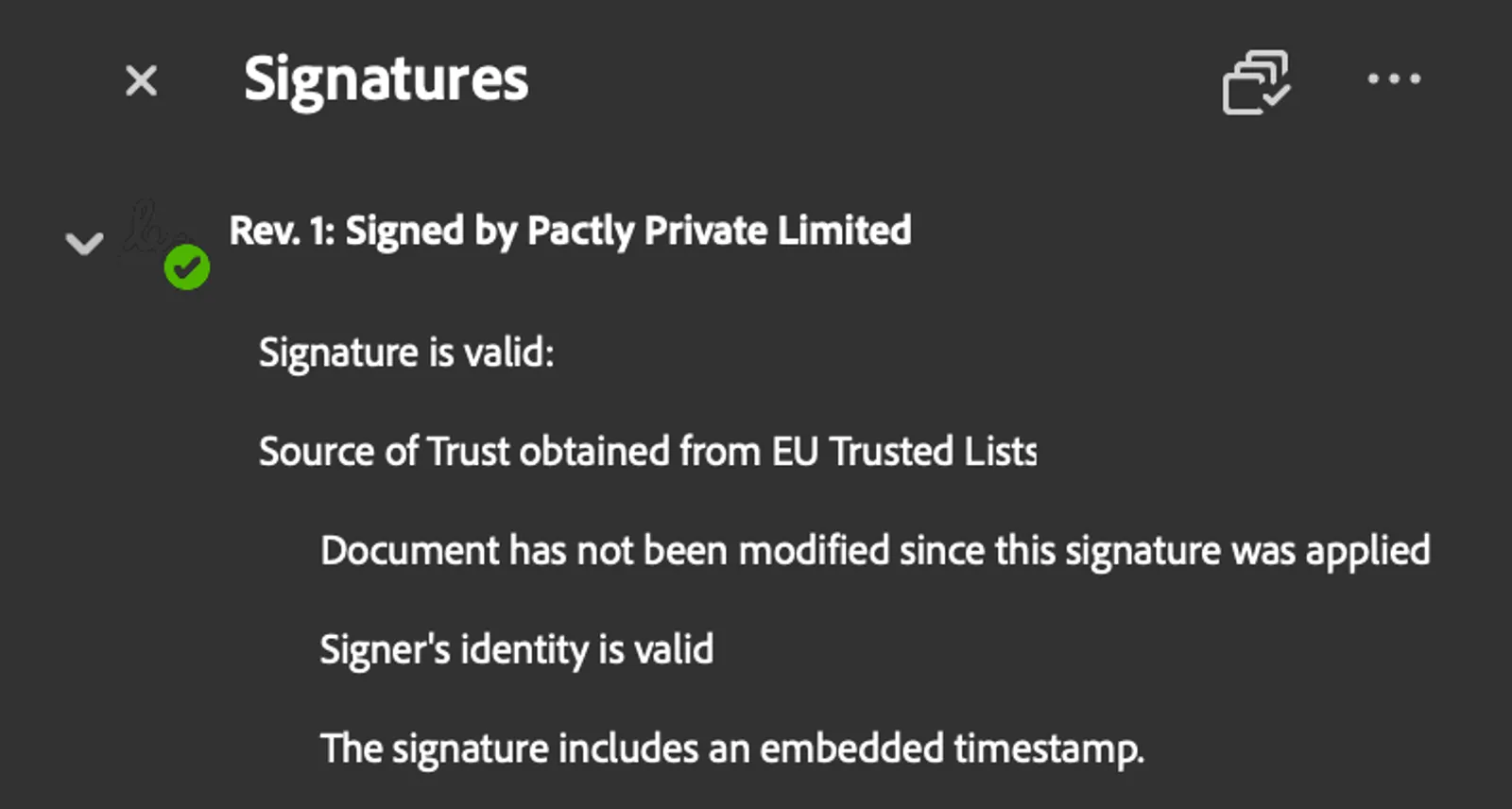
- A green checkmark, Adobe’s signal that the signatures are valid and the document is trusted.
- The signer identity, shown as Pactly Private Limited, the authority that sealed the document.
- Tamper evidence, a statement that the document has not been modified since it was signed. If anyone changes so much as a character after signing, the reader flags it.
- A timestamp from a trusted time-stamping authority, recording when the document was sealed. The time comes from an independent service rather than from the clock of whoever sent or opened the file.
The seal keeps working over time
Section titled “The seal keeps working over time”Because the time of sealing is recorded by a trusted time-stamping authority and carried inside the file, a sealed document still validates years later, after the certificate used to sign it has itself expired. Someone opening the contract well after execution sees the same confirmation you see the day it was signed, with no action needed from you in the meantime.
Documents that already carry a signature
Section titled “Documents that already carry a signature”Some contracts reach Pactly with a signature already on them, added by a counterparty or another provider before you uploaded the file. Sealing such a document no longer disturbs the signature that is already there, so the earlier signature keeps validating alongside Pactly’s seal.
To keep that guarantee, a document that arrives already signed keeps the older way of placing the signing marks on the page. Contracts that start in Pactly use the newer approach, which is why Adobe Acrobat no longer shows an “Annotations Modified” note on them.
Your documents stay in Pactly
Section titled “Your documents stay in Pactly”Sealing a document does not send it anywhere. Pactly uses only a cryptographic fingerprint of the file, a short unique value computed from its contents, to create the seal. The contract itself never leaves Pactly, so you get third-party-verifiable signatures without handing the document to an outside service.